Saturday, July 22, 2006

Sometimes you just have to scrap

I posted a few days ago about my getting some scrapping done. I am finally making it back to post my layouts here for everyone to see. Hey, sometimes it takes a little more time than anticipated.

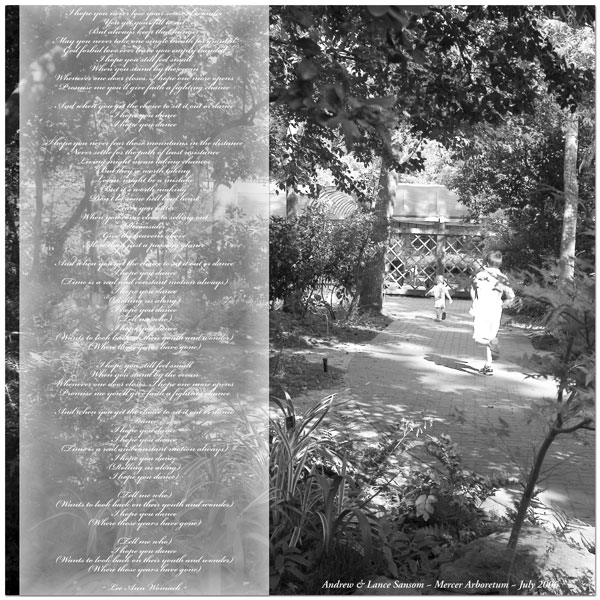
I call the first layout "Wonder" as it includes the lyrics to Lee Ann Womack's "I Hope You Dance." I thought it was just fitting for this picture. This is a picture of my oldest son chasing after my youngest son who was off to explore the arboretum without anyone else. He had a grand old time running around and checking everything out - especially the fish ponds. He was totally fascinated by the fish. I still need to scrap those pictures.

Credits:
Everything made by me.

Fonts used:
Bickham Script Pro
Adobe Garamond Pro

Programs used:
Adobe Photoshop CS2


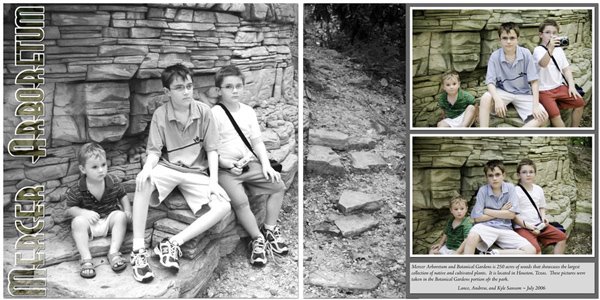
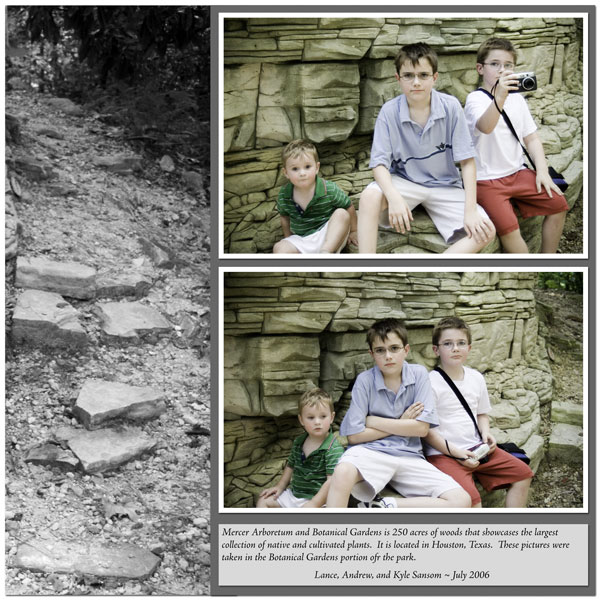
This next layout is a 2 page spread featuring all 3 of my boys on our trip to the arboretum. It was incredibly hot that day we went, but I think they all had a great time just seeing all there was to see. They had this lovely stone wall area that was perfect for resting (and for mommy to snap some pictures). I don't do many 2 page spreads, but this one was just fun.


Credits:
Everything made by me.

Fonts used:
Real Virtue
Adobe Jenson Pro

Programs used:
Adobe Photoshop CS2


And here are the 2 pages individually:

Wednesday, July 19, 2006

Good things are to come

I was asked the question, "How do you describe your scrapping style?" That is a hard question to answer in some ways, but in others it is SO EASY to answer. Simple! I am definitely a simple kind of person. I don't care for elaborate embellishments. I also prefer to have my pictures tell the stories. For me, it is all about the photos and what is going on in the photos. I journal where I have to, but I'd rather my pictures do the talking where they can. I have found that in a lot of ways, this carries over into the digital scrapbooking kits I am designing. I try to keep them simple. I also try to keep them fairly gender neutral. I do have 3 boys after all. I don't get a whole lot of use out of pink and ruffles.

I thought it was about time for me to share some more previews from my upcoming kits. I am not sure where I will release them just yet, but I am working on some leads. I am excited about them at any rate. I haven't used any of these myself, but I know that my friend and digital scrapbooker, Karen, can't wait to get her hands on these. In due time. . .

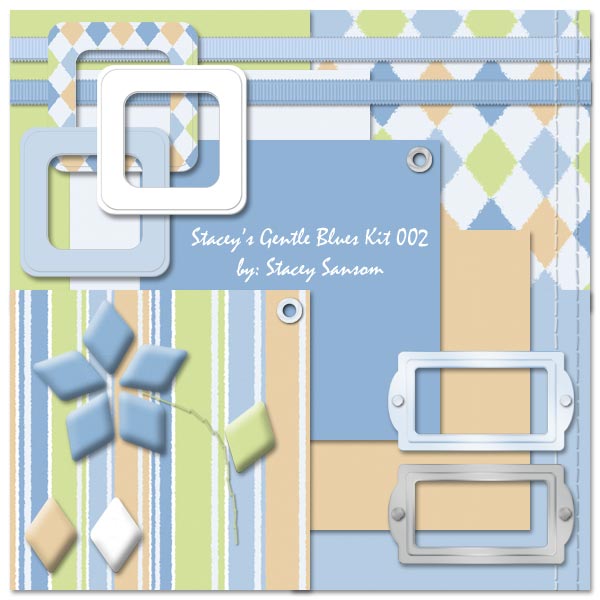
I couldn't leave the Gentle Blues kit series with just 1 kit, now could I? Another kit in the series that is sure to be fun for both girls and boys.

Title: Stacey's Gentle Blues Kit 002

Main colors: Blues

Patterns: Stripes and Argile

Papers: 5 solid, 2 patterned

Elements: 3 slide mounts, 2 ribbons, 2 rows straight stitching, diamond tiles (flower, plus extra tile colors) with stitched stem, 2 metal bookplates with tacks, and 2 eyelets

I bet you were starting to think that there was a trend in the shades of blues found in the Gentle Blues Kits. I did a total "Gotcha" with this kit. This kit took on a much warmer and earthy tone and feel. I think it is striking for both boys and girls.


Title: Stacey's Gentle Blues Kit 003

Main colors: Blues

Patterns: Stripes and abstractish Stars

Papers: 6 solid, 2 patterend, 3 curved/torn

Elements: 2 leather straps, 1 star buckle, 4 paper tags, 4 slide mounts/frames, and straight stitching

I am not 100% certain that these are the only elements that will be found in this kit. Still trying to decide if anything else will overdo the kit, or if we've reached the "enough is enough, already" point.

Now we're onto a kit that hasn't earned is elements yet. Don't let that fool you, this kit is rich with colorful papers. I don't know, maybe the papers will be the focus on this kit. Anything could go at this point.


Title: Stacey's Gentle Blues Kit 004

Main colors: Blues

Patterns: Stripes and Polka Dots

Papers: 11 solid, 2 patterned

Elements: None yet.

Ramblings and going ons

Well I didn't get the SBB store position, but that's ok. I was super disappointed at first. It took forever for them to announce who the new store members would be. The anticipation just kept building and building. Disappointment followed. The reality is though, it doesn't directly reflect the quality of my stuff. I was up against a lot of talented designers. It must have been hard for them to select the few they wanted.

I am not giving up. I could just open my own store. I can't imagine where I would find the time to do it though. Things are soo busy in my life right now. Getting a position in an already established store would be best for me. I'd be able to focus on turning out new product and spend less time worrying about keeping a site up to date. It isn't outside my capabilities, but it is outside of my current time restraints.

I have a couple of leads I am following currently and am hoping that at least one of them will turn up the great opportunity.

I am not sure how it happened, but I finally found the time, or rather, motivation to scrap. Sunday I scrapped 3 pages in a matter of about 5 hours. It was SO THERAPUETIC!!!

Thursday I went with my photographer friend, Marissa Sutherland, to Mercer Arboretum with the photography group she is in. She thought it would be helpful. I was hesitant, but I figured it would be a good opportunity to pick up the camera again and get some practice. I was working mostly on exposure. I was having tons of problems with getting the right exposure with the digital Rebel. I got lots of practice moving from sunny spots to full shade. I got some good pictures of the boys while I was out. I ended up scrapping 4 of those pictures in the 3 layouts I did (a one page and a two page spread). They turned out wonderfully.

I have several more pictures I want to scrap. I just need to find time to do it.

I have also started another kit. I know, I know. . . "finish the other ones, aready!" I am working on it. Spare time is something I don't have a whole lot of these days. Summers are just crazy that way. Just think, I won't be turning out just one kit and you'll be waiting for more. I'll be turning out several and while you're working with those kits, I'll be turning out more. Who doesn't win? I have 2 kits that are ready outside of just exporting everything to the appropriate PNG and JPG formats and creating their TOU files. I have 2 kits that are mostly finished, they just need finishing touches -- adding some elements, exporting to the appropriate formats, and then creation of their TOU files. Then there are the other 2 that need elements. I do have one kit that is just all papers. Initially, I thought I'd add elements to the papers, but at this point I don't think I will. The papers are done and so I'll probably just release them as a paper pack.

Keep checking back, I'll be posting my most recent layouts and previews for my new kits.

Sunday, July 02, 2006

Please be patient

I am in the process of consolidating 2 blogs to make it so that I only have 1 digital scrapbooking blogs to maintain. I am hoping that doing such will allow me more time to actually blog and update as I go.

So, please be patient if you see things changing.

I am a Digital Scrapbook Place Mentor

I just received my 3 month assignment for 2 mentee's at Digital Scrapbook Place. I decided I really wanted to help others and this opportunity came up, so I applied. I am surprised that I was assigned to help 2 people. I'm excited! I've already heard from one person.

Maybe this will be the motivation to get me scrapping regularly again? I don't know. I am just having problems getting motivated. When I want to scrap, I am too busy. When I have time, I just don't want to scrap. *sigh* It is a vicious cycle, I suppose. The new digital camera is helping a lot to get the motivation sparked. Let's see if it stays more than a spark.

At any rate, I am excited to be a DSP mentor. I am hoping that it will be a learning experience for all of us.

Saturday, July 01, 2006

Digital Scrapbooking should be my priority

Digital scrapbooking should be my priority, but the reality is that I have other things in my life that take over. I have been so busy that I can't even think about digital scrapbooking most days. When I do have time I am so stinking tired that I just can't bring myself to scrap.

Alas, I have scrapped 1 page in the past couple of months. This is since the Ultimate Digital Scrapper contest. I didn't make it past round 1, but it did break me out of my shell. Anyway, here is the latest page I have done.

Credits:
Everything is made by me.
Fonts used: Helterskelter (not sure where I got it from) and Artistamp (www.haroldsfont.com)
Program used: Adobe Photoshop CS2

I am not sure what caused the sudden "need to scrap." It might have something to do with the fact that I have a new digital camera to play with and while it isn't a perfect transition from my old digital camera along with the really crappy pictures I am also getting some really great pictures as well.

I am sort of disappointed that I haven't had more time. There is so much that I want to do. I was supposed to start selling in the store at ScrappyKats but it seems that the owner has gone A-WOL. It is unfortunate. I am sure that she just got busy with life, moving, and a new baby. Still. . . But the opportunity has come up that if I can pull it off in time Scrapbook Bytes has a call out for designers for their store. I WANT TO SO BAD! I hope that I can get everything together tonight or tomorrow and get it submitted. HOPEFULLY!!! It would be an amazing opportunity.

So off to compile the requirements for the SBB store stuff. . . .

Friday, May 05, 2006

Let the contest go on. . .

I overcame my fear and personal insecurities and entered a digital scrapbooking contest. The 2006 Ultimate Digi-Scrapper Contest over on digiscrappin.biz to be exact. Now I don't know if I have totally snuffed out the insecurities, but this was a good start. There are a lot of good entries. There are some big names in the digital scrapbooking world. It should be fun!

Here is a link to the contest's gallery: 2006 Ultimate Digi-Scrapper Contest Gallery -- Week One

And since there are 370+ registered entrants, here is a direct link to my contest entry: Stacey's first week entry.

Thanks for looking.

Wednesday, May 03, 2006

You want me to do what?

Just when things seem to be looking up and things start going as I *want* them to, life gets busy again. Can it stop already? I just want to sit and relax for a few weeks. Enjoy the scrapbooking. Sip lemonade. Design more digital scrapbooking page kits. I don't want much. Really I don't.

So I have. . . I believe. . . 6 kits started. That is a HUGE improvement over a month ago. Of course, they are not ready for "public release" just yet. I still have things to do. I just need time. More of it. I have 2 that just need the finishing touches (Terms of Use, converting everything to proper formats, etc). The other 4 are still needing little things to make the kit *feel* complete. . . then again, the finishing touches. It isn't that I don't want to finish them for another 6 months. Gosh, I'd have them ready for release tomorrow if I had the time.

Life is just too busy right now. Of course, I could be working on those kits (or any number of other things I have to get done) instead of typing all this. I'm taking a break!

My class is coming to a close. It is out mid-May. This is good. However, the final is the FINAL PROJECT that is a real site for a real-life, legit company. No big deal. HA! This project counts for more than HALF of my grade. So, I have to do my best on this project. No half-assing it. Of course, the "schedule" for completion just caught me off guard. I am going about my daily life, thinking "there are 3 weeks of class left." *laugh* Who would have thought that you'd actually have to turn the project in EARLY?!??! So I have to finish the first draft for submission BY Friday. No big deal. I've already got it started. I just need to plug in the information and finish the layout for the subpages of the website.

Then while I am still thinking that I had 3 weeks of classes left. . . there are only 2 weeks left now. . . my "web business" partner calls. We've got an unhappy client. No big deal, we'll make the customer happy. Or at least try our hardest. So I also have a site REDESIGN to do on top of this major project. *scream* Fortunately, it shouldn't be too hard. It is just that I have so much other stuff to do. I'll get it done somehow. ASAP is come and and almost gone.

Oh, but home life doesn't let up either. We've started painting the house. We started the baby's room. I was supposed to get a 2nd coat of paint up this week. NOT HAPPENING! I've got 2 websites to do instead.

Let's not forget that other people demand things of our time as well. . . tutoring, computer tech support, shopping for things, phone calls, on and on and on. . . Oh, I ran for office of the Phi Theta Kappa Honor Society -- Treasurer. It was an uncontested race. . . hmmmm. . . I wonder where I will find the time to devote to that.

Can I sit down and scrap?

The good news is that in all of this, I have MANAGED TO SCRAP!!! Yes, REAL DIGITAL SCRAPBOOK PAGES! Not kits. PAGES! I have started two 2-page spreads. That's nice. I have yet to finish them, but with everything else that is going on, I am surprised that I even got started. BUT the biggest move for me in the digital scrapbooking world is that I entered a digital scrapbooking contest. I entered the digiscrappin.biz's Ultimate Digi-Scrapper 2006 contest. I don't know why. It is insane with everything else going on. The first deadline is 11pm on Friday, May 5th. *panic* How am I going to get this done?!?!?!?

Tuesday, April 18, 2006

Another preliminary preview

I initially started a kit call "Gentle Blues" it was supposed to be appropriate for a baby boy without being "baby-ish." The ideas started. The ideas kept coming. So fast they came. I couldn't keep up. It started off as a small kit and it quickly grew and grew and grew. Eventually (and rather quickly, I might add), it contained 25 different patterned papers. Scratch that single kit idea. I broke it down and ended up with the starts of at least 5 smaller (but good sized kits). Then the lull in the desire to complete them hit. The rutt in digital scrapbooking started.

I am pleased to announce that once I got past the initial kit (Stacey's Circles Kit), the ideas started flowing again. I really did scratch the entire "Gentle Blues" kit. I did. I had to. I started over fresh. Thus resulting in a series of kits called "Gentle Blues."

I am actually happy with the results thus far. The purpose of these kits are to contain the color BLUE and variations of blues, while also containing other complementary colors. My goal is to have kits that are simple and boyish, yet are universal. You won't find fancy frills in these kits. Maybe in some of my future kits, I'll venture off into the more frilly edges of the universe, but for now I am catering to my boys.


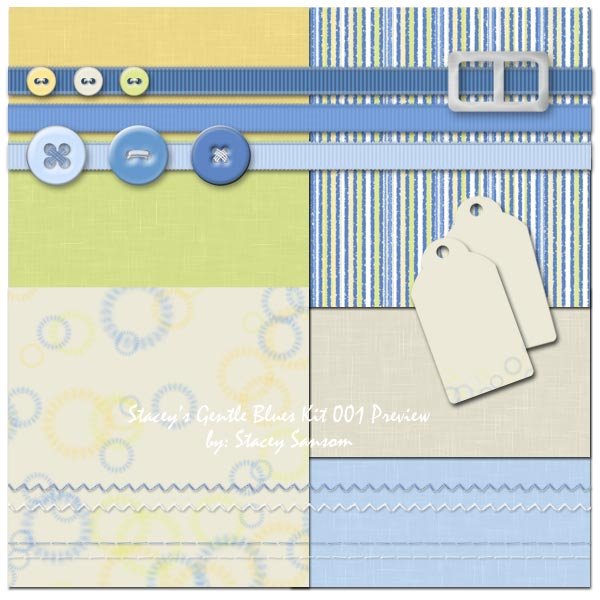
Title: Stacey's Gentle Blues Kit 001
(1st in a series of kits)
Main colors: Blues
Patterns: Stripes and faint circles
Papers: 2 patterned, 4 solid
Elements: Buttons (2 different sizes), paper tags, ribbons, rectangular buckle/slide, and stitching (zigzag and straight)

This kit is not 100% complete as of yet. I am looking to add a couple more elements. Its release to the public will be soon.

Monday, April 17, 2006

The well can't run dry forever

or can it?

While this post isn't about tutorials or anything of that nature, I wanted to share that I have found an end to the dry spell I have had in creativity. I had started some digital scrapbooking kits so long ago. That was where it got to. I had several started, maybe 6-8 kits started. They just didnt' get very far. I was in a rutt with scrapbooking too. I haven't completed a page since January. It is sad to say. It is the truth.

But, I started the designing process again a couple of weeks ago. It was slow and painful at first. As the hours rolled by, the easier the whole process became, the faster and more freely the ideas flowed. I am happy to announce that big things are coming. Well, maybe not so big, but a big deal for me. I am excited and pleased to announce that within the next month I should be releasing 5 digital scrapbooking kits.

With that said, I also hope to be able to get back into preparing tutorials to help others in their quest for digital scrapbooking perfection. It is fun, but there is so much to learn. There are so many techniques to figure out. You just have to find you happy place and work things out for yourself sometimes.

Anyway, I have started to post the preliminary previews.

The long awaited

I am finally releasing the preliminary preview for my first kits. It has been a long process, but once the creative juices got flowing things started to come to me.

The first kit created by me to be released to the public will be -- Stacey's Circles Kit. It is a bold kit. It is a bit more bold than *I* use myself, but I know plenty of people that go for the bolder side of things. I think it is a fun kit and can be used for both boys and girls. The official release for this kit should be sometime in the next week. I still need to work out the logistics.

Title: Stacey's Circles Kit

Main colors: blues and purples (bold)

Patterns: circles

Papers: 4 patterned papers, 6 solid papers

Elements: ribbons, metal bookplates, paper tags, round tags (with metal edges), tag ties, eyelets, and brads

Monday, April 10, 2006

Yet again, no new pages to boast about

I still haven't completed a scrapbook page, but I have started another kit. I suppose soon enough, I'll have pages again. I now have my middle child's first karate tournament to scrap. That said, I was serious when I said I had been creating and was wanting to create more. The other 2 kits are still without "finishing touches" but I want to sit on them for a few days and see what I need to add after not looking at them for a couple of days. I am excited about starting a new kit. It is sometimes hard to decide just what color combinations will be a hit, but I am working on my own visions at this point. Keep being patient, good things are coming!

Friday, April 07, 2006

Still no new digital scrapbook pages

I still haven't finished any more scrapbook pages. I have, however, gotten out of the rutt I was in. At least, that is what it is feeling like. I am currently working on creating another kit.

I still haven't released the initial kit I have designed, but I am sure that I'll want to add some finishing touches to it so I have set aside 2 weeks as my "sleep on it" period. I just want it to be finished when I do release it. I am also not 100% decided on how I am going to release it. I have already found a "creative team" member that will help me get the word out. I am excited about that. Everyone will see the kit once she's gotten her hands on it.

I also want to finish this kit I am working on now. The new kit. I just don't want this to become a 1 kit project. I want there to be a whole line of kits created by me. I know that time is tight so getting a good start now and not getting ahead of myself is one of the best things that I can do. So everyone just be patient. Good things are coming.

I will also be creating a kit based on the things my brother encounters during his 2 years in Prague, Czech Republic. The architecture is lovely over there. The colors on the buildings are delightful. I told him I would scrap his pictures for him. I haven't gotten started yet, but I am hoping that this new "change" in the norm will help get me the start I need. My goal is to base a kit or kits off of the things that are common in the areas he will be in. A lot of the patterns will probably be based off the architecture. I am excited about it. Now I just need to be sure to find the time and put my heart into it.

Tuesday, April 04, 2006

Life gets in the way

Well, I hadn't really scrapped, digitally or otherwise, since mid to late January. This was the last scrapbook night I attended with my friends here. It is a travesty. I am just a very busy person. I have 3 kids, a husband, and everything that this involves. I am a student. I am a business owner. So I am just busy. It was starting to drag me down though. I LOVE to digital scrapbook! I was missing it something awful. With the kids and everything else, I don't always have the time to finish my school work in a timely manner. It is just hard. Most of the time I have to wait until after the baby goes to bed and then I am usually too tired. As the routine became, I either didn't have time when I wanted to OR I didn't have the desire if I did find the time. However, this week I managed to get my homework done and submitted early. As a reward, I decided I was going to scrap. Sounds like a nice reward. Of course, it turned into more work as I ultimately want to complete some digital kits. I have a bunch started. None finished. So yesterday and today I have been working on one of the kits that I started a LONG time ago. The good news is that it is coming together nicely. I have many thanks to offer Karin Godak for the encouragement, the motivation, the pep talk, and everything else. The bad news is that I probably won't be releasing the kit to the general public right away. Don't worry, if you are interested it isn't too far off in the future. I just want to complete a couple more before I start releasing the kits. So everyone hang in there! Be patient! There is a lot of work that goes into putting together digital kits.

Thursday, January 12, 2006

what did these earlier works become?

Previous post: a comparison of earlier works

I started scrapbooking 5x7 layouts for a special project. It was a project of love. I wanted to provide my husband's grandmother with pictures of the kids that wouldn't be a burden on her to carry around the nursing home in her walker basket. I need something small, hence 5x7.

I decided that I was going to redo the three 8x10 layouts I showed in my previous post (see link at the top of this post). I just wasn't happy with them. I had learned a bit since the time I had created those layouts.

Here is what they became:


The same pictures. The same elements. The same fonts. Different layouts.

Fo what it is worth, smaller layouts offer a nice challenge. How do you get it all on there without looking crowded and over done? Sometimes I do better than others. It is a fun challenge though.

A comparison of earlier works


It is important to constantly learn and grow.

In my opinion, it is also important to NOT get emotionally attached when we are first learning how to do something. As we gain knowledge and skills, we need to take a look back and see what we have learned and take the steps necessary to become better at whatever we are doing. Sometimes it is important to look back on some of our earlier works and see how we can improve them. It is ok to look back and reflect. It is wonderful to bask in the joy of growth.

Here are some earlier pieces I worked on. They were 8x10 layouts. I selected this size because I COULD print it at home on my own printer with my own paper of choice. I won't even say that these were 100% completed before I moved on and "redesigned" them. I thought it would be interesting for others to see where we come from. Maybe it will give them more desire to improve, grow, and digiscrap more. *wink*

== Important credits ==
There are not a whole lot of credits to give. All of the elements used were made by me. The tags, the patterned paper, torn paper, vellum, the bards. . .

Fonts used on Andrew's layout: Palantino Linotype (in italic)
Fonts used in Kyle's layout: Comic Sans
Fonts used in Lance's layout: Palantino Linotype

== Programs used ==
» Macromedia Fireworks MX
» Adobe Photoshop Elements 2
» Adoble Photoshop 7

I think the thing that I learned most about doing these three layouts is to just have fun. No, I won't call them my best works of art. At the same time, I won't call them my worst.

In reality, I learned a lot while working on these three layouts. Each layout offered it's own challenges. I learned how to make patterned paper. I learned how to tear paper. There is a fine art to tearing paper digitally. It isn't an exact science either. I learned a lot of about dropping shadows and making things appear to be more realistic when compared to a true paper scrapbook page. I played with image correction and alteration (turning to sepia tones, editing things out, etc). I even stepped right into playing with color.

It is important to learn the programs that you are using. The more you know about your digital scrapbooking "environment," the more comfortable you will be. If you are comfortable, you will will be willing to try different things. If you are using one program and you have given it a real honest effort, don't be afraid to change to something else. Just think about how it will look on your resume. *wink*

A Christmas Layout

Christmas is always fun, but it often yields a lot of pictures around my house. I suppose I don't have to take as many pictures, but that takes the fun out of it doesn't it? I am not even sure how many pictures I took this year, but I have gotten really good at getting those candid shots of the kids opening presents. Granted, not all of them turn out. I only ask for a few out of many, that's all.

Here is a layout for Christmas 2004:


Everything was made by me. The patterned paper. The metal words.

Font used for the metal words: Gigi
Font used for the titles and other text: Footlight MT

Programs used: Adobe Photoshop 7

Wednesday, January 11, 2006

Does Size Matter?

The beauty of digital scrapbooking is that you can scrap whatever size you want. It just doesn't matter. The only limitations on this are: your imagination and what your computer is capable of handling.

That said, there are factors to consider when selecting the size you'll do your layouts. Some of these things include:


» computer's limitations
» hard drive space
» printing options
» presentation
» desire
» photo resolutions

These are by no means the only things that you should consider when picking your layout sizes, but they are important to think about nonetheless.

A digital layout can have a very large file size. It can be RAM intensive. It can demand a lot from your computer. A 12x12 layout can easily run you 100-150MB (or more) on your hard drive – easily. Keep this in mind before you get started. Make sure you have the hard drive space before you get started to save yourself a lot of frustration down the road.

Questions you should ask yourself are:

» How will I store and/or present my layouts?
» Are albums readily available?
» Will my layout be a two page spread?
» Does consistency matter to me?

Today the most common scrapbook sizes are: 12x12, 8.5x11, 8x8, and 6x6. The most popular are by far the 12x12 and 8.5x11. This, however, doesn't mean that you cannot scrap other sizes, either bigger or smaller. That is the fun of it. You pick the size you like and go from there.

Unless specifically stated, kits available are 12x12 in size. These can easily be resized. I will address this in a different tutorial.

You do not even have to scrap the same size all the time. You can scrap according to your needs and/or wants. For example, I started a special 5x7 (landscape) scrapbook for my husband's grandmother. A small album size filled the need and was easily carried around in a walker basket. Albums in the landscapre orientation where harder to find, but they are available both locally and online. This size offers a challenge – getting the stuff on the page. It is a small size and doesn't yield itself well to a lot of photos or embellishments, but it suited my needs. Incidentally, that size is perfect for filling a monitor screen for screensavers and online sharing.

I like the 8x8 size. It isn't too larger and it isn't too small. To me, it is just right. Albums are readily available that size.

You should consider your photo resolutions before picking a size. If you have older digital images, you likely will not be as impressed with their quality at 8x10 size, but they might be perfect for a 4x6 size. Keeping this in mind when you are doing your layouts will not leave you disappointed in the quality. You cannot improve the quality of a low resolution image so don't make it larger than it has the quality to be. You can easily use more smaller images with your older digital images. This is a consideration when scanning images as well -- scan at higher resolution than you think you will need, it is easier to scale down than up.

Let's talk software

Digital Scrapbooking Software

Now let's talk software!

Digital Scrapbooking doesn't necessarily require any fancy software to get started. It doesn't. It doesn't even completely require graphic editing software as many desktop publishing packages are quite capable of handling the digital scrapbook layouts. You aren't limited to just a few pieces of software. You can use one, two, or a combination of any that you like. This is in no way a complete listing of software available or even usable.

Graphic editing software that can be used for digital scrapbooking:


» Adobe Photoshop
» Adobe Photoshop Elements
» Jasc Paint Shop Pro
» Corel Draw
» Microsoft Digital Image Pro
» Microsoft Picture It
» Macromedia Fireworks
» The Gimp
» Ulead Photo Impact

Like I said, this is not an all inclusive list, but it is one that is simply intended to get you started.

The most important things about selecting the software you will use to do your digital scrapbooking are:


» will run adequately on your computer
» supports PNG, JPG, and GIF formats
» supports transparency
» works in layers (or the similation of layers)
» has the ability to drop shadows
» and you are comfortable using it.

I don't recommend trying to run Adobe Photoshop CS2 on a computer more than a couple of years old, but the older version 7 would still run relatively efficiently on a computer of that age. So you need to make sure you know what your computer can and/or will handle first and foremost. You will be happier in the long run if you do that.

You do not even need the most recent version of these software packages, but there is a point where it is time to draw a line above the Titanic and work up. Adobe Photoshop Version 7 is still a very ample program, but Photoshop version 5 will yield some problems. Photoshop Elements 3 is perfectly acceptable. Photoshop Elements 2 has some problems rendering transparency on certain files.

The point is, you do not have to sell the family farm to get the software needed to scrapbook digitally. There are so many options. With the options come a variety of prices as well. That is the beauty of it all.

Keep in mind that Adobe and Macromedia are now the same company – Adobe. Jasc and Corel are now the same company – Corel.

It is important that the software supports PNG, JPG, and GIF formats. PNG and JPG are the most common digital scrapbook formats available on the web today. Any kits that you download for free or buy will contain files in the PNG or JPG formats. PNG and GIF formats support transparency. JPG are high quality, compressed files.

Transparency is important in that you don't want your embellishments to be on white (or any color for that matter), unless your page is white. You want realistic embellishments on the page colors and patterns of your choice. Transparency is important!

Drop shadows give your digital layouts a sense of realism. While a montage style layout may not require drop shadows, if you want to duplicate the realistic paper like scrapbook pages, drop shadows are key to your success.

Layers allow you to put things behind others. You layer things on a traditional paper scrapbook layout, you'll do the same digitally.

It is also important that you are comfortable using the program of your choice. Whatever you chose to use, learn how to do the basic things. Go to the library and get books. Go to the bookstore and get books. Go online and do web searches. Read the help files that came with your program. Take a class if one is available. Learning the program and and its techniques and terminology is essential to completing a digital scrapbook page without extreme levels of frustration. Think of it this way, it is one more piece of software you would be able to put on a resume if you ever needed to, so take the time to learn it. Enjoy learning it.

Software Overview

I want to give a brief overview of the software options in the list above. Please keep in mind that this in no way will be a comprehensive list. It is not intended to be. It is what my understanding about these programs are, nothing more. This is to simply raise awareness of what some of your options are.

Many of these programs offer “free trials” for a period. If you are not certain what program is best for you and your learning style, feel free to try a few out and see what suits you best.

» Adobe Photoshop
Adobe Photoshop is probably the most expensive of the software packages available. It is the leading image editing software on the market in many aspects. It is quite pricey. Street price is approximately $650 for the most recent version. That isn't to say that you cannot get it cheaper, but that's the retail price. If you are a student and/or teacher, check academic pricing. Photoshop is a professional grade program. There is a learning curve, but with patience and practice the general user can learn the basics of Photoshop in a short time. There are a ton of books that can help guide you in your learning endeavors. Online tutorials are readily available.

» Adobe Photoshop Elements
Adobe Photoshop Elements is the stripped down version of Photoshop. It holds its own for digital scrapbooking and is totally ample for the general user who does not need or what the bells and whistles that Photoshop has to offer. It also has the added benefit that it is affordable for the general consumer. Retail price is approximately $90-100 for Version 4 (current version for PC) or $80-90 for Version 3 (current version for Mac). There are plenty of books to read up on how to use this program. Online tutorials are readily available. From what I have read, Elements 4 is digital scrapbook friendly. Photoshop Elements is more user friendly than Photoshop. It is an excellent program to test your feet out in the world of digital scrapbooking.

» Jasc Paint Shop Pro
Paint Shop Pro is a very user friendly program. It is also very affordable. Retail price for the most recent version X is approximately $130. In the Paint Shop family, there is Paint Shop Xtras – Scrapbooking Editions. Retail price is approximately $20. But how neat is it that a major software producer has taken scrapbookers under their wings and provided them tools to use specifically for scrapbooking? There are 7 different editions of the Xtras for scrapbooking to fit a variety of scrapbooking styles. Online tutorials are readily available for Paint Shop Pro. Many of the digital scrapbooking specific tutorials found online are for Paint Shop Pro. It is a great program to test your feet out in the world of digital scrapbooking and beyond.

» Corel Draw
I believe the most recent version of Corel Draw is Corel Draw Graphics Suite 12. Retail price is approximately $400. Or, there is the Corel Creative Collection that is only $130. Like Adobe, Corel has different levels of programs to suit different users. There are some tutorials available online. However, Corel has put some digital scrapbooking relevant tutorials on their own website.

» Microsoft Digital Image Pro

» Microsoft Picture It

» Macromedia Fireworks
Retail price is approximately $300 for Fireworks 8 (most recent version). The one benefit to Fireworks is that its native file format is PNG. Makes it easy in the sense that most kit elements are going to be PNG. It is my understanding that Fireworks was intended for the “web graphics” industry more so than photo editing, but I personally think that it could hold its own in the industry. I used it exclusively with no problems until I made the switch to Photoshop.

» The Gimp
The Gimp is an open source software package. It is free. It is similar to Adobe Photoshop, that was their intentions anyway. There is a learning curve. In some ways, I would say that it is worse than Photoshop, but in other ways I wouldn't say it is any worse. The major drawback to this is that documentation and tutorials are typically limited. However, doing a Google search did yield online tutorials that could easily be used for digital scrapbooking purposes.

» Ulead Photo Impact
Retail price is approximately $90 for version 10, or approximately $100 for PhotoImpact Pro 10.
Getting started with digital scrapbooking

If you are new to digital scrapbooking, there are some basic tools that you will need to acquire. The list is the same for anyone whether or not you've paper scrapped before or not. That is the beauty and simplicity of digital scrapbooking. My goal in providing this information is to simply get you started. Which particular “brand” you choose to use from the tools on this list is entirely up to you, I am only giving you a list to get started with. As you grow and learn, you can change your tools and adapt to your new style and techniques.

Basic Digital Scrapbooking Tools


Keep in mind, that this is the basic list. It is in no means a complete list. It will not suit the needs and/or wants of everyone.

Basic digital scrapbooking tools include:
1. Computer
2. Graphics Software
3. Digital Pictures

That is pretty much all you need to get started with digital scrapbooking. Pretty simple, huh?

Now, don't panic if you don't have a digital camera. A digital camera is NOT required to digital scrapbook. That is the beauty of picture CDs that you can get when you drop off your film for development. If you have a scanner, you can scan printed pictures you already have. If you do not have a scanner, you can take them to a film developing place that does have one (ie Kodak Picture Kiosks).

Don't think that you need to rush out and buy a brand new computer. You don't. Many people make do with what they have. Digital scrapbooking only requires 2 things in bulk – RAM and hard drive space. If you've got that, you are good to go! I'll go more into detail on this in a little bit.

Don't think that you have to rush out and buy the latest and greatest graphic editing software to get started with digital scrapbooking either. You don't. You might have something on your computer right now that will work to get you started. If you are already comfortable using a particular software package, don't feel you have to change. You don't. So look on you computer and see what you have.


Optional Digital Scrapbooking Tools

Now that we've covered the basics, let me give you a list of optional tools. Remember, these are not required to digital scrapbook, but they can be useful.

Optional digital scrapbooking tools include:
1. Digital Camera
2. Scanner
3. Photo Printer
4. CD or DVD Burner

A digital camera make it super easy to get your digital pictures. Do not feel that you have to go out and buy a new digital camera if you have an old one. Just keep your current camera's capabilities in mind when you are designing your layouts. If you don't ask more of it than it is capable of, it won't disappoint you. A scanner can be used for scanning old pictures, embellishments, and other things. A photo printer can be used to print your layouts or just simply to print proofs before you have them printed at a lab. The CD/DVD burner is to help take care of the “space” problems that many digital scrapbookers run into.

Now, you're probably wondering just how much RAM and harddrive space you'll need if you many digital scrappers run into “space” issues. It is entirely up to you. I recommend no less than 256MB of RAM. Remember that how much your NEED is highly dependent on the software package you choose to use. Before upgrading to any software, I highly recommend that you check the software's minimum and recommended requirements before making your final decision.

As for hard drive space, that is entirely up to you. I wouldn't have anything less available hard drive space than you have RAM. For example, if you have 256MB of RAM, I highly recommend that you have a minimum of 265MB of harddrive space available for use. This is especially true if you are running Adobe Photoshop or Adobe Photoshop Elements (more so Photoshop than anything). A typical digital layout can run between 30-100MB easily! The larger your layout, the larger your file size. If you chose to use other peope's predesigned page kits, you will need storage space for them and they can be huge! I highly recommend that you have NO LESS than 3-4Gig of free space on your hard drive at any given time, but I like having room to breathe.

If you do have limited hard drive space but you also have a CD burner, then don't panic. Do a few layouts and see what your own average layout file size is. Typically a CD will hold about 700MB of information. If your average layout is 50MB, then you will be able to get approximately 13-14 layouts per CD. You can do that number of layouts and then burn them to CD and free up your hard drive space again.

Of course, you can always get an external hard drive to use just for digital scrapbooking. It is entirely up to you.

Credits: Stacey Sansom's "Summer Delights" | Fonts used: ...............